Payments
Overview
Payments are built into every pre.dev app: Stripe, already wired up, in test mode until you go live.
Every project built on pre.dev can take payments without creating a Stripe account, pasting keys, or registering webhooks. pre.dev Payments is powered by Stripe: your workspace gets a Stripe account behind pre.dev, the build agent uses the ordinary Stripe SDK, and pre.dev delivers Stripe’s events to your app’s server while you build.
What you get
| Nothing to set up | The Stripe keys are already in your app’s environment. Ask the build agent for “a $9/month plan” or “a checkout button” and it works. |
| Real Stripe | Checkout, subscriptions, customers, invoices, refunds, the billing portal. Any Stripe API and any Stripe example, unchanged. |
| Webhooks that reach your app | Stripe events are relayed to your app’s webhook route in the project’s sandbox, signed with the project’s own secret. |
| Test mode while building | Pay with card 4242 4242 4242 4242. No real money moves until you go live. |
How it works
Your app talks to Stripe through api.pre.dev with the workspace’s pre.dev key. pre.dev sends each request to Stripe for your workspace’s Stripe account and returns Stripe’s response. The Stripe SDK needs its host pointed at pre.dev, which the build agent sets from variables that are already there:
import Stripe from 'stripe';

export const stripe = new Stripe(process.env.STRIPE_SECRET_KEY!, {
  host: process.env.STRIPE_API_HOST,
  protocol: (process.env.STRIPE_API_PROTOCOL as 'https' | 'http') || 'https',
  ...(process.env.STRIPE_API_PORT ? { port: Number(process.env.STRIPE_API_PORT) } : {}),
});
That is the whole integration. See built into every app for the variables and the browser side, and webhooks for event delivery.
Payment code runs on your app’s server, in the project’s sandbox. A published app serves only its built front end, so checkout and webhook routes are not available at its published address.
Where money and events go
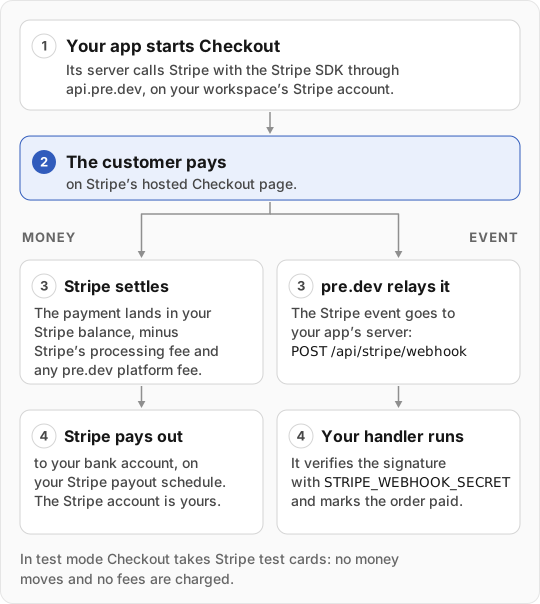
- Your app’s server starts Checkout with the Stripe SDK, through
api.pre.dev, on your workspace’s Stripe account. - The customer pays on Stripe’s hosted Checkout page.
- Stripe settles the payment to your Stripe balance, minus Stripe’s processing fee and any pre.dev platform fee on live payments, and pays out to your bank on your Stripe payout schedule.
- pre.dev relays the Stripe event to
POST /api/stripe/webhookon your app’s server, signed withSTRIPE_WEBHOOK_SECRET. Your handler verifies it and marks the order paid. See webhooks.
Test mode and going live
While you build, payments run in Stripe test mode on an account pre.dev created for your workspace. Checkout accepts Stripe’s test cards and nothing is charged.
To take real money, connect a Stripe account you own once from Integrations → Built-in, then switch any project from test to live in its Built-in tab. See go live.
Bring your own Stripe account
If you already have a Stripe account, paste your own sk_… key as STRIPE_SECRET_KEY in the project’s environment variables. pre.dev then drops its host override and account id, and your app talks to Stripe directly. Also replace STRIPE_PUBLISHABLE_KEY (and its VITE_ and NEXT_PUBLIC_ copies) and STRIPE_WEBHOOK_SECRET with your own values; pre.dev’s stay in place until you do. Webhooks for your own account are yours to register in the Stripe dashboard.
Not available through the built-in key
Account management, application fees, and Stripe products that need a platform-level agreement return 403 with an explanation. That covers accounts, account links and sessions, apps, application fees, Apple Pay domains, country specs, Financial Connections, Identity, Issuing, Radar, reporting, Sigma, bulk tax rates, Terminal, and Treasury. Everything an app normally does to take money is available.