Coding Agent
Coding Agent
Build and maintain software in the web workspace or your local terminal.
Describe a change, give the agent the project context it needs, and review the code and evidence it produces. pre.dev supports new apps, existing repositories, planning, implementation, browser verification, and publishing.
How a change moves
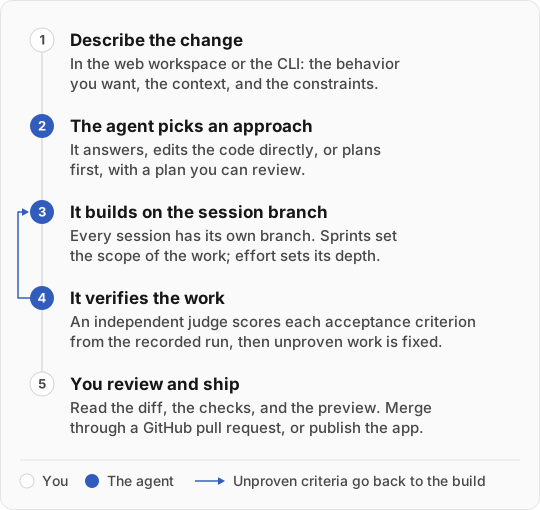
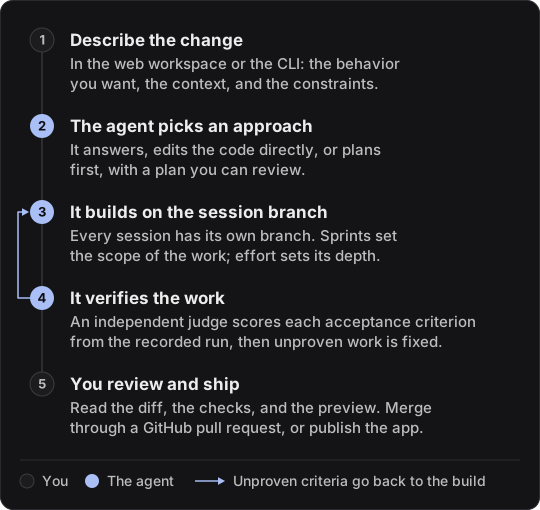
- You describe the change in the web workspace or the CLI: the behavior you want, the context, and the constraints.
- The agent picks an approach. It answers a question, changes the code directly, or plans a larger task first. Ask for a plan in your message when you want to shape requirements and architecture before it builds. See how the agent works.
- It builds on the session’s branch. Every session has its own branch. Sprints set the scope of the work, and effort sets its depth.
- It verifies the work. An independent judge scores each acceptance criterion from the recorded run, and the agent fixes what is unproven. See verification.
- You review and ship. Read the diff, the verification result, and the preview, then merge through a pull request or publish the app.
Make the first request useful
Give the agent an outcome it can implement and you can verify:
Add assignee and status filters to the issue board.
Keep the existing card layout. Filters should work together,
and an empty result should offer a way to clear them.
For existing code, include what happens today and what should change. For a new app, start with one working flow before expanding the scope.
Choose your workspace
| Surface | Best starting point |
|---|---|
| Web | Create a project, import GitHub code, review plans, preview, and publish |
| CLI | Work directly in a local checkout and review changes with your usual Git tools |
| Architect API or MCP | Generate specifications for another development workflow |
The web and CLI share project records, planning artifacts, and account settings where supported. A session can run on your laptop through the CLI or in the cloud; see sessions.
Was this page helpful?