Get started
pre.dev documentation
The Long Horizon Coding Agent, plus APIs for specifications, browser tasks and hundreds of AI models. pre.dev Labs sells verified RL coding tasks to frontier AI labs.
pre.dev is the Long Horizon Coding Agent: it builds software and exposes the pieces behind it as APIs. pre.dev Labs also builds and sells verified RL coding tasks to frontier AI labs for model post-training; see pre.dev for AI labs.
| Product | What it does | Start with |
|---|---|---|
| Coding Agent | Builds, verifies, and publishes apps, in the web workspace or your terminal | Build your first project |
| Architect | Turns a description into a specification with milestones, stories, and architecture | Generate a spec |
| Browser Agents | Runs tasks on websites and returns structured data, or lets your coding agent use your own Chrome | Run a browser task |
| AI Gateway | One OpenAI-compatible API for hundreds of models from every major lab, paid with pre.dev credits | Call a model |
| Payments and Authentication | Stripe payments and user sign-in, built into every app you build on pre.dev | Built into every app |
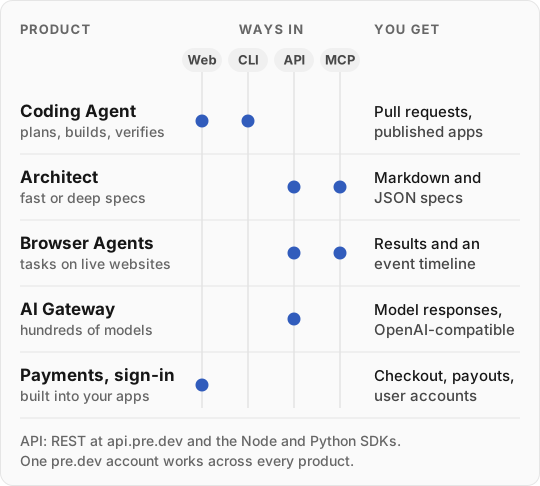
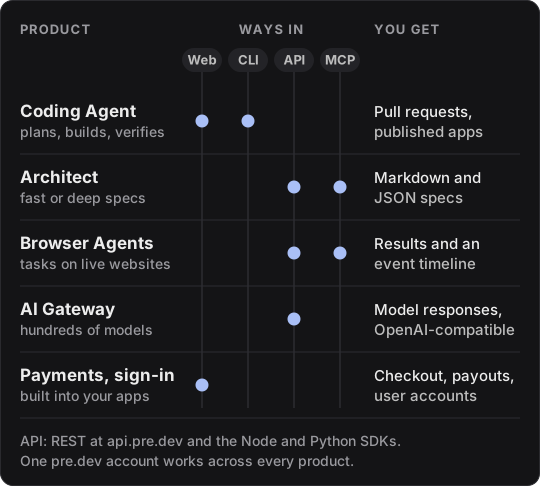
The Coding Agent works in the web workspace and the CLI, and its memory of how you work and what matters in each project also reaches Claude Code, Cursor, and other agents through MCP. Architect and Browser Agents are available over REST, the Node and Python SDKs, and MCP; the AI Gateway over REST. Payments and sign-in come built into apps you create in the web workspace.
Choose your interface
| Work from | Use | Start with |
|---|---|---|
| A browser | The web workspace for code, plans, previews, and publishing | Build your first project |
| A local repository | The CLI and your existing Git workflow | Install the CLI |
| Your application | REST, the AI Gateway, or the Node and Python SDKs | API overview |
| Another AI assistant | The pre.dev MCP server, set up with one command | Connect MCP |
| Interface | Base URL |
|---|---|
| REST: specifications, browser tasks, and credits | https://api.pre.dev |
| AI Gateway | https://api.pre.dev/v1 |
| Hosted MCP server | https://api.pre.dev/mcp |
The public API covers specifications, browser tasks, and AI model calls. For code implementation, start in the web workspace or CLI.
Build an integration
Get an API key
Find your key, send it, and check which accounts each interface accepts.
Handle results and errors
Recognize terminal states, recover from failures, and retry safely.
Giving these docs to a coding assistant? Start with the guide for agents and the OpenAPI files for the REST API and the AI Gateway. For plans and usage, see plans, credits, and pricing.