Browser Agents
Get run status and results
Retrieve a browser run, individual task outcomes, retry counts, and optional execution timelines.
Use the id returned by task submission. A run is also called a batch in the API and SDK types.
curl --fail-with-body "https://api.pre.dev/browser-agent/$BATCH_ID" \
  -H "Authorization: Bearer $PREDEV_API_KEY"
Batch and task states
Batch status is processing, completed, or failed. Stop polling on either terminal state. A completed batch may contain unsuccessful tasks.
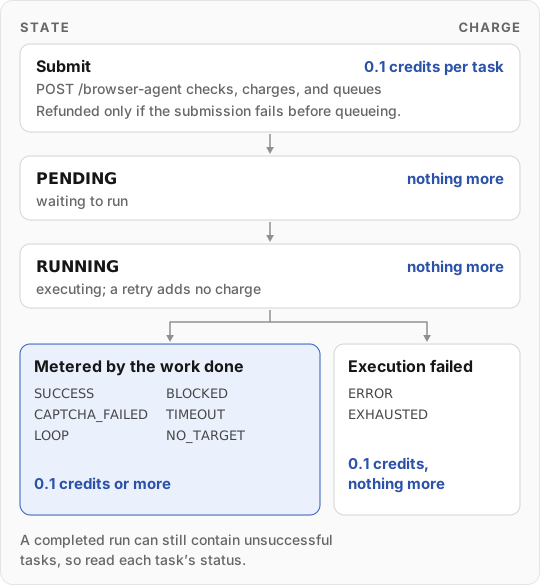
| Task status | Meaning | Charge |
|---|---|---|
PENDING | Waiting to run | The floor, charged at submission |
RUNNING | Execution has started | Nothing more; a retried attempt adds no charge |
SUCCESS | The task succeeded | The floor, plus any usage above it |
BLOCKED | The site blocked the task | The floor, plus any usage above it |
CAPTCHA_FAILED | A challenge could not be completed | The floor, plus any usage above it |
TIMEOUT | The execution budget expired | The floor, plus any usage above it |
LOOP | Repeated actions prevented progress | The floor, plus any usage above it |
NO_TARGET | The requested target or usable result was not found | The floor, plus any usage above it |
ERROR | Another execution failure; read error | The floor and nothing more |
EXHAUSTED | The run stopped responding before it finished, and no retry could finish it in time | The floor and nothing more |
Every browser task is charged a 0.1-credit floor when you submit it, so you need available credits to start. When the task finishes, it is charged any usage above the floor, whether it succeeded or not. Only an ERROR or EXHAUSTED task keeps the floor and nothing more.
In-progress results
results is aligned to task order. An entry can be a terminal result, a PENDING/RUNNING stub, or null when task details are unavailable. Pending entries need not include data, durationMs, or creditsUsed.
The detail response counts result slots in completed, including synthesized entries. Use status, not completed === total or array length, to decide whether the run is finished.
Additional fields can include:
| Field | Meaning |
|---|---|
name / taskNames | Generated display names, when available |
results[i].attempts | Execution attempts; greater than one indicates a retry |
results[i].queuePosition | Advisory position for pending work; zero for running work, or null if unavailable |
results[i].instruction, input, output | Original task inputs when available |
totalCreditsUsed | Sum of reported task credit usage |
Inspect task status before using data. Treat display names, queue position, and timestamps as optional.
Event timeline
Set includeEvents=true when you need execution evidence:
curl --fail-with-body "https://api.pre.dev/browser-agent/$BATCH_ID?includeEvents=true" \
  -H "Authorization: Bearer $PREDEV_API_KEY"
results[i].events contains available task events. liveEvents[i] can contain events for unfinished tasks; completed slots can be empty arrays. These fields can remain present after batch completion.
An event uses { type, timestamp, iteration?, data }, where timestamp is Unix time in milliseconds. Types include navigation, plan, action, screenshot, validation, done, error, and lifecycle events. Accept unfamiliar event types and inspect their payloads instead of assuming a closed list.
Screenshot payloads can contain inline image data rather than a URL. Events vary by execution path and are not guaranteed for every step. Timelines can be large, so omit them from routine status checks. The existing-run stream provides a snapshot followed by live updates.
Errors
| Status | When |
|---|---|
400 | id is not a valid run ID |
401 | Missing or invalid key |
404 | No run with this ID in your account |
Each status has an example body in the response examples. See errors and retries.
curl -X GET "https://api.pre.dev/browser-agent/string"fetch("https://api.pre.dev/browser-agent/string", { method: "GET"})package mainimport ( "fmt" "net/http" "io/ioutil")func main() { url := "https://api.pre.dev/browser-agent/string" req, _ := http.NewRequest("GET", url, nil) res, _ := http.DefaultClient.Do(req) defer res.Body.Close() body, _ := ioutil.ReadAll(res.Body) fmt.Println(res) fmt.Println(string(body))}import requestsurl = "https://api.pre.dev/browser-agent/string"response = requests.request("GET", url)print(response.text)import java.net.URI;import java.net.http.HttpClient;import java.net.http.HttpRequest;import java.net.http.HttpResponse;import java.net.http.HttpResponse.BodyHandlers;import java.time.Duration;HttpClient client = HttpClient.newBuilder() .connectTimeout(Duration.ofSeconds(10)) .build();HttpRequest.Builder requestBuilder = HttpRequest.newBuilder() .uri(URI.create("https://api.pre.dev/browser-agent/string")) .GET() .build();try { HttpResponse<String> response = client.send(requestBuilder.build(), BodyHandlers.ofString()); System.out.println("Status code: " + response.statusCode()); System.out.println("Response body: " + response.body());} catch (Exception e) { e.printStackTrace();}using System;using System.Net.Http;using System.Text;var client = new HttpClient();var response = await client.GetAsync("https://api.pre.dev/browser-agent/string");var responseBody = await response.Content.ReadAsStringAsync();use reqwest::{Result, Client};async fn main() -> Result<()> { let client = Client::new(); let url = "https://api.pre.dev/browser-agent/string"; let res = client .get(url) .send() .await? .text() .await?; println!("{}", res); Ok(())}{ "id": "507f1f77bcf86cd799439011", "total": 1, "completed": 1, "results": [ { "url": "https://example.com", "status": "RUNNING", "queuePosition": 0, "attempts": 1 } ], "totalCreditsUsed": 0, "status": "processing"}{ "id": "507f1f77bcf86cd799439011", "total": 1, "completed": 1, "results": [ { "url": "https://example.com", "status": "SUCCESS", "data": { "heading": "Example Domain" }, "creditsUsed": 0.1 } ], "totalCreditsUsed": 0.1, "status": "completed"}Your pre.dev workspace API key (pdk_...) from Integrations, Built-in tab: https://pre.dev/projects/integrations?tab=built-in
In: header
Path Parameters
24-character record ID.
^[a-fA-F0-9]{24}$Query Parameters
falseResponse Body
application/json
Batch with available results and optional events.
TypeScript Definitions
Use the response body type in TypeScript.
application/json
Invalid request.
TypeScript Definitions
Use the response body type in TypeScript.
application/json
Missing, invalid, or ineligible authentication.
TypeScript Definitions
Use the response body type in TypeScript.
application/json
Record unavailable.
TypeScript Definitions
Use the response body type in TypeScript.
application/json
Request failed.
TypeScript Definitions
Use the response body type in TypeScript.