> ## Documentation Index
> Fetch the complete documentation index at: https://docs.pre.dev/llms.txt
> Use this file to discover all available pages before exploring further.
# Roadmap & Tracking
> Follow your build on a Kanban board or Gantt timeline, sync it to Linear or Jira, and get email updates with screenshots.
pre.dev turns your spec into a living roadmap. As agents build, statuses update in real time — on a Kanban board, on a Gantt timeline, in your project management tool of choice, and in your inbox.
Type `/kanban` or `/roadmap` in the chat to jump straight to the roadmap view.
## Roadmap Structure
The roadmap tracks three levels of detail:
* **Milestones** — Top-level phases of delivery
* **Stories** — Feature-level requirements within each milestone
* **Subtasks** — Granular implementation steps within a story
Completion rolls up automatically: when every subtask in a story is done, the story is done; when every story in a milestone is done, the milestone is done.
The roadmap comes from your project's spec. If you haven't generated one yet, the roadmap view prompts you to generate it first.
## Kanban Board
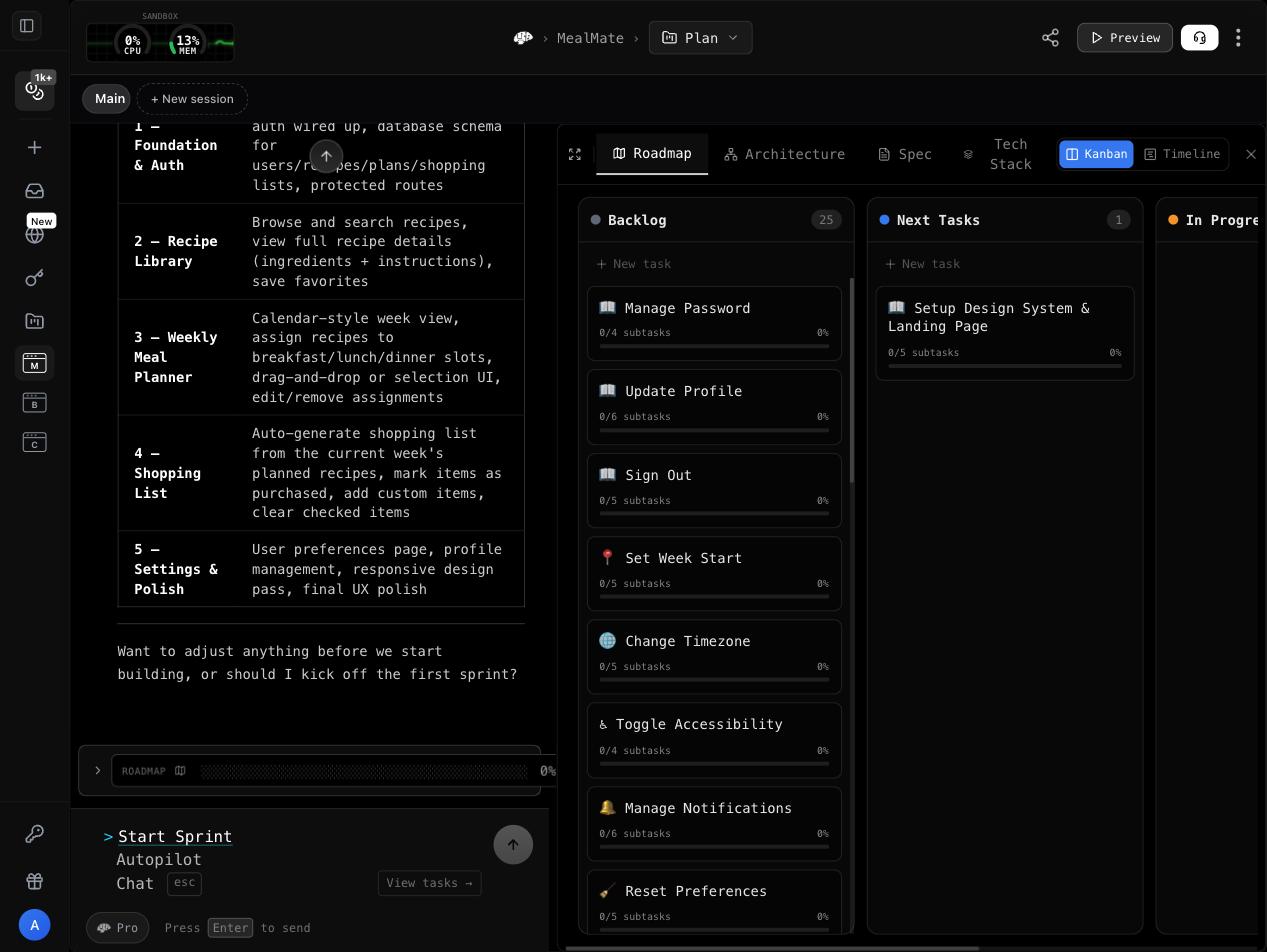 The default roadmap view is a Kanban board with four columns:
| Column | What's in it |
| --------------- | ------------------------------------------------------------------------------------------------ |
| **Backlog** | Stories waiting their turn |
| **Next Tasks** | What the agent will pick up next — the upcoming stories auto-fill here, and you can pin your own |
| **In Progress** | What an agent is building right now |
| **Done** | Completed stories |
The board is fully interactive:
* **Drag and drop** — Move a card between columns to change its status. Drag a story into **Next Tasks** to prioritize it, or back to **Backlog** to defer it. Reorder cards within a column to set sequence.
* **Add stories** — Create a new card with just a title; pre.dev writes the description and acceptance criteria for you automatically.
* **Edit stories** — Click a card to edit its details. Cards show which milestone they belong to, the user-flow step they implement, and the architecture components they depend on.
* **Live updates** — Statuses stream in as agents work, without losing your place or your local ordering.
While an agent is actively building, you can't manually drop cards into **In Progress** — that column reflects what the agent is really working on.
## Gantt Timeline
The default roadmap view is a Kanban board with four columns:
| Column | What's in it |
| --------------- | ------------------------------------------------------------------------------------------------ |
| **Backlog** | Stories waiting their turn |
| **Next Tasks** | What the agent will pick up next — the upcoming stories auto-fill here, and you can pin your own |
| **In Progress** | What an agent is building right now |
| **Done** | Completed stories |
The board is fully interactive:
* **Drag and drop** — Move a card between columns to change its status. Drag a story into **Next Tasks** to prioritize it, or back to **Backlog** to defer it. Reorder cards within a column to set sequence.
* **Add stories** — Create a new card with just a title; pre.dev writes the description and acceptance criteria for you automatically.
* **Edit stories** — Click a card to edit its details. Cards show which milestone they belong to, the user-flow step they implement, and the architecture components they depend on.
* **Live updates** — Statuses stream in as agents work, without losing your place or your local ordering.
While an agent is actively building, you can't manually drop cards into **In Progress** — that column reflects what the agent is really working on.
## Gantt Timeline
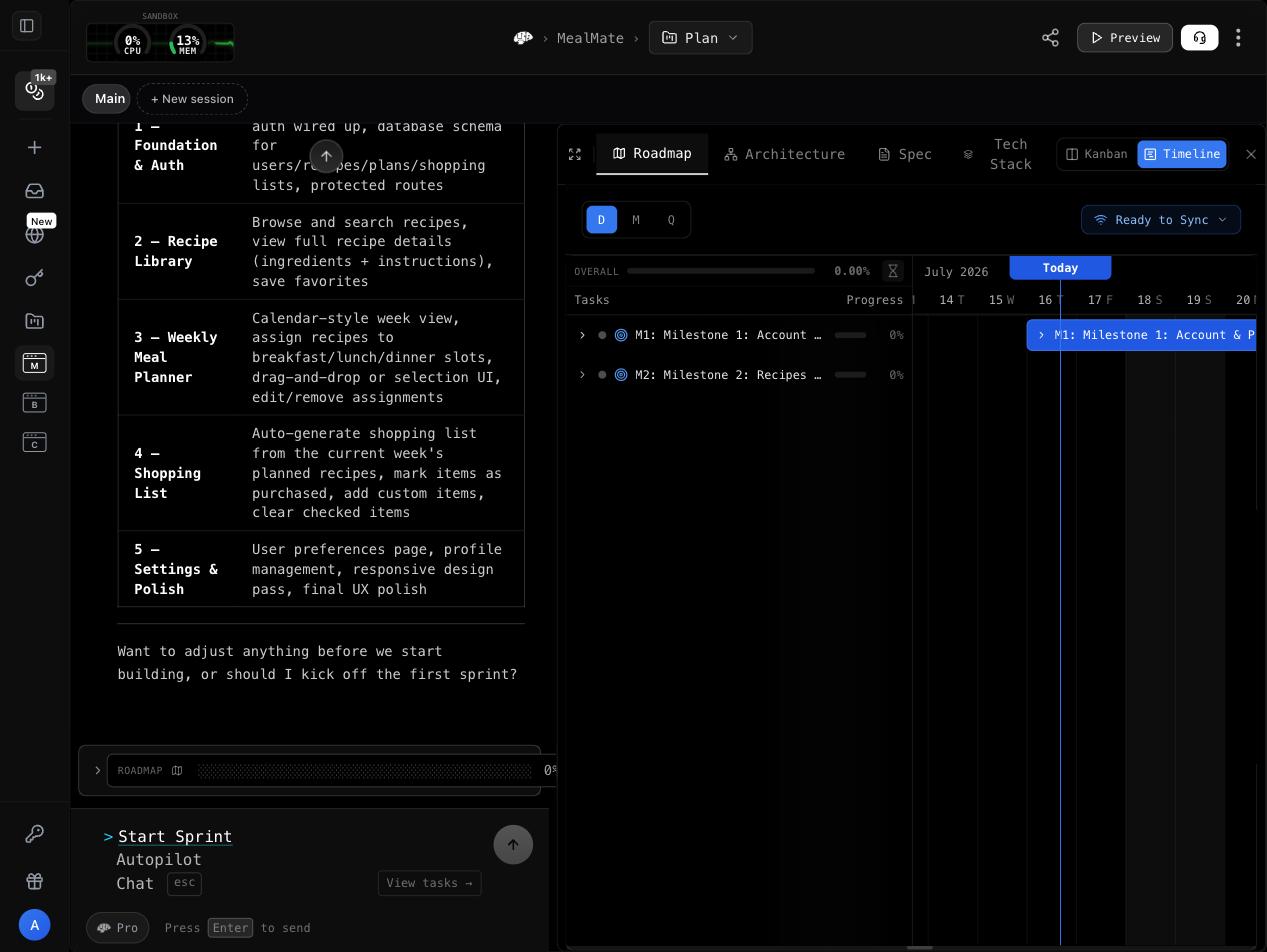 Toggle from **Kanban** to **Timeline** to see the same roadmap as a Gantt chart:
* **Hierarchy** — Milestones (M1, M2, …) with their stories and subtasks nested beneath
* **Status colors** — Gray (not started), amber (in progress), green (done)
* **Progress bars** — Milestone and story progress is computed live from subtask completion
* **Effort estimates** — Estimated hours per milestone
* **Zoom levels** — Daily, monthly, or quarterly granularity, with a today marker
## Real-Time Updates
When agents are building, the roadmap updates live:
* Stories move to **In Progress** when an agent picks them up
* Stories move to **Done** as work completes, and progress rolls up to the story and milestone bars immediately
* New stories the agent scopes out appear on the board as they're created
* Kanban and Timeline stay in sync — they're two views of the same roadmap, so a drag on the board shows up on the timeline too
## Milestone Screenshots
As agents complete work, they capture screenshots of the running app. Each milestone on the timeline shows a strip of these screenshots — visual proof of what was actually built, not just a checked box.
Click any thumbnail to open a full-screen gallery with keyboard navigation and capture timestamps, so you can flip through the build history of a milestone at a glance.
## Task Statuses
| Status | Meaning |
| ----------- | --------------------------------- |
| Not Started | Not yet picked up |
| In Progress | Currently being built by an agent |
| Done | Finished |
You can change a story's status yourself at any time — drag it on the Kanban board or edit it directly.
## Roadmap Sync: Linear & Jira
Push your roadmap into the tool your team already uses. From the roadmap's sync menu:
1. Connect your **Linear** or **Jira** account (a standard OAuth sign-in — see [OAuth Connectors](/coding-agent/integrations/oauth))
2. Click sync — pre.dev creates a project in your workspace and creates issues from your milestones and stories
3. When it finishes, you get a direct link to the created project
Sync is versioned against your roadmap. When the roadmap changes — new stories, edits, re-scoping — a **Sync new changes** prompt appears, and re-syncing updates the issues in Linear or Jira to match the current roadmap.
Sync is one-way: pre.dev is the source of truth, and each sync brings the external project in line with your roadmap. Progress streams into the sync panel while it runs, so you can watch issues land.
Connecting **GitHub** does something different: it creates a repository and pushes each session's work to its own `predev/` branch, with pull requests into `main`. See [Pull Requests](/coding-agent/building/pull-requests) for how code review works.
## Email Notifications
You don't have to watch the dashboard. pre.dev emails you at the moments that matter:
### Ready to build
When the architecture phase completes, you get an email with an architecture overview and a link to start the build.
### Question waiting
If the agent is blocked on a clarifying question and you've stepped away, the email **is** the question — shown in full, with one-click answer buttons. Clicking an answer submits it and drops you straight into the building project. Each question emails you at most once, and you can always skip: pre.dev makes sensible choices you can change later.
### Progress milestones
At 25%, 50%, 75%, and 100% completion you get a progress email — sent once per threshold — with:
* A progress bar showing how far along the build is
* Screenshots from the most recent build session
* A link straight back to your project
### Waiting on you
If the agent finishes its current work and the project is sitting idle waiting for your input, you get a reminder with recent screenshots and a **Continue Building** link back to where you left off.
## Using Progress for Decision-Making
The roadmap helps you decide:
* **When to switch modes** — If early PRs look good, switch to Autopilot
* **Where to focus review** — Prioritize reviewing complex milestone PRs
* **What to adjust** — If a milestone is taking too long, simplify the spec
* **When to ship** — Once key milestones are complete, you might ship early and iterate
## What's next?
Bring teammates into the project.
Run multiple workstreams at once.
Toggle from **Kanban** to **Timeline** to see the same roadmap as a Gantt chart:
* **Hierarchy** — Milestones (M1, M2, …) with their stories and subtasks nested beneath
* **Status colors** — Gray (not started), amber (in progress), green (done)
* **Progress bars** — Milestone and story progress is computed live from subtask completion
* **Effort estimates** — Estimated hours per milestone
* **Zoom levels** — Daily, monthly, or quarterly granularity, with a today marker
## Real-Time Updates
When agents are building, the roadmap updates live:
* Stories move to **In Progress** when an agent picks them up
* Stories move to **Done** as work completes, and progress rolls up to the story and milestone bars immediately
* New stories the agent scopes out appear on the board as they're created
* Kanban and Timeline stay in sync — they're two views of the same roadmap, so a drag on the board shows up on the timeline too
## Milestone Screenshots
As agents complete work, they capture screenshots of the running app. Each milestone on the timeline shows a strip of these screenshots — visual proof of what was actually built, not just a checked box.
Click any thumbnail to open a full-screen gallery with keyboard navigation and capture timestamps, so you can flip through the build history of a milestone at a glance.
## Task Statuses
| Status | Meaning |
| ----------- | --------------------------------- |
| Not Started | Not yet picked up |
| In Progress | Currently being built by an agent |
| Done | Finished |
You can change a story's status yourself at any time — drag it on the Kanban board or edit it directly.
## Roadmap Sync: Linear & Jira
Push your roadmap into the tool your team already uses. From the roadmap's sync menu:
1. Connect your **Linear** or **Jira** account (a standard OAuth sign-in — see [OAuth Connectors](/coding-agent/integrations/oauth))
2. Click sync — pre.dev creates a project in your workspace and creates issues from your milestones and stories
3. When it finishes, you get a direct link to the created project
Sync is versioned against your roadmap. When the roadmap changes — new stories, edits, re-scoping — a **Sync new changes** prompt appears, and re-syncing updates the issues in Linear or Jira to match the current roadmap.
Sync is one-way: pre.dev is the source of truth, and each sync brings the external project in line with your roadmap. Progress streams into the sync panel while it runs, so you can watch issues land.
Connecting **GitHub** does something different: it creates a repository and pushes each session's work to its own `predev/` branch, with pull requests into `main`. See [Pull Requests](/coding-agent/building/pull-requests) for how code review works.
## Email Notifications
You don't have to watch the dashboard. pre.dev emails you at the moments that matter:
### Ready to build
When the architecture phase completes, you get an email with an architecture overview and a link to start the build.
### Question waiting
If the agent is blocked on a clarifying question and you've stepped away, the email **is** the question — shown in full, with one-click answer buttons. Clicking an answer submits it and drops you straight into the building project. Each question emails you at most once, and you can always skip: pre.dev makes sensible choices you can change later.
### Progress milestones
At 25%, 50%, 75%, and 100% completion you get a progress email — sent once per threshold — with:
* A progress bar showing how far along the build is
* Screenshots from the most recent build session
* A link straight back to your project
### Waiting on you
If the agent finishes its current work and the project is sitting idle waiting for your input, you get a reminder with recent screenshots and a **Continue Building** link back to where you left off.
## Using Progress for Decision-Making
The roadmap helps you decide:
* **When to switch modes** — If early PRs look good, switch to Autopilot
* **Where to focus review** — Prioritize reviewing complex milestone PRs
* **What to adjust** — If a milestone is taking too long, simplify the spec
* **When to ship** — Once key milestones are complete, you might ship early and iterate
## What's next?
Bring teammates into the project.
Run multiple workstreams at once.